Build backup power around the exact medical device.
A battery alone is not a plan. Pair the device record with an approved power path, measured runtime, labeled cables, current contacts, maintenance dates, and a leave-by trigger.
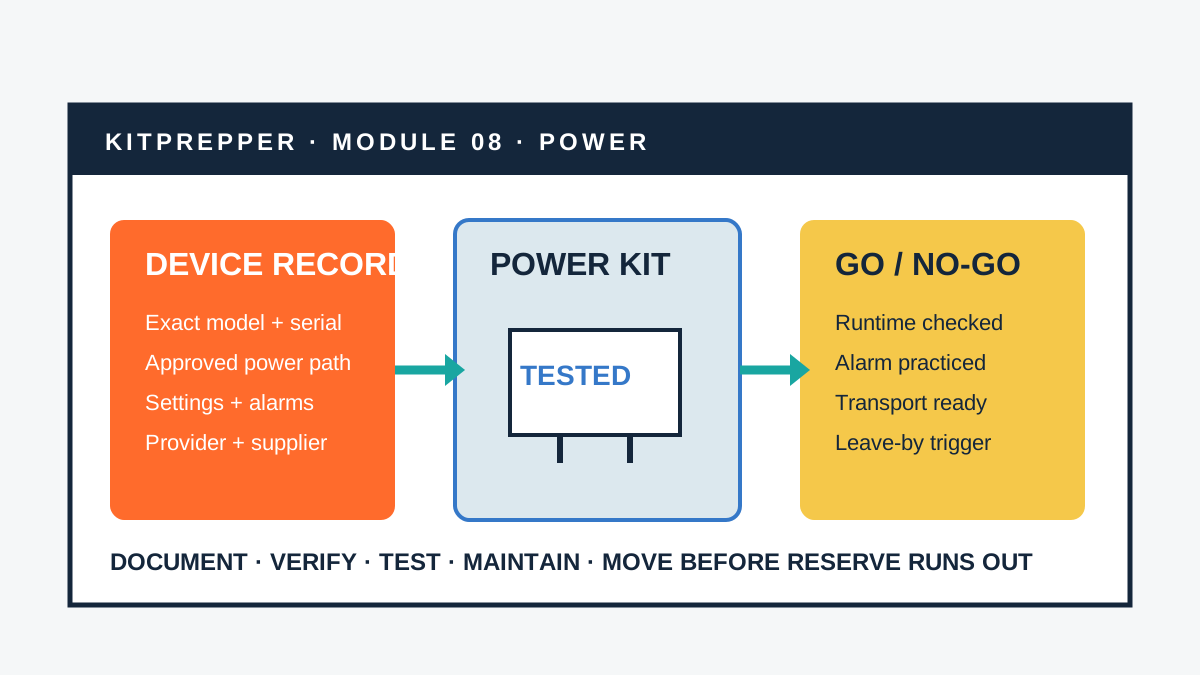
Why a generic “CPAP battery” list is not enough
Search demand spikes after storms because people discover the power dependency at the worst moment: the device stops during sleep, a battery is somewhere in storage, or a power station runs much less time than expected. Public discussions in 2026 repeatedly ask the same questions: Will backup switch automatically? Does a humidifier change runtime? Is the cable compatible? Can one battery cover a full night? Those are useful planning questions, but other users’ results are not specifications for your device.
FDA advises people who use electrically powered home medical devices to prepare for power outages and keep a device-specific contact record. Its outage booklet asks for the device and model number, utility, fire and ambulance services, home-care agency, healthcare providers, device supplier, and current medicines. FDA also notes that devices may be affected by loss of power, moisture, and contamination during emergencies.
The module in this guide organizes those decisions. It does not prescribe a power source or alter therapy. Some devices sustain life or deliver time-critical treatment; others affect sleep, mobility, communication, monitoring, temperature control, nutrition, or medication delivery. The safe response to interruption differs by device and person.
Start with one device record
Do not begin by shopping for the largest battery. Begin with the equipment that must keep working. Record every component needed for ordinary operation, including accessories that seem secondary but change power demand or therapy.
Device name, manufacturer, model, serial number, firmware if relevant, supplier, and current manual.
Approved AC adapter, DC input, voltage, connector, polarity, wattage, battery model, and charger.
Settings, accessories, consumables, alarms, storage limits, and interruption instructions from the care team.
Weight, case, tubing, water or supplies, mobility equipment, transport, destination, and responsible person.
Photograph the rating label and every connector. Store a printed record with the module and a protected digital copy. Label cables by device and direction; two plugs that fit physically may not be electrically compatible. Keep the original adapter available unless the manufacturer approves another arrangement.
If one therapy uses multiple devices—such as a breathing device plus an oxygen source, humidifier, heated tube, monitor, suction equipment, or feeding pump—map the entire treatment system with the care team. A battery that powers one component may leave another required component unavailable.
Ask five questions before choosing backup power
- What happens when power stops? Does the device alarm, continue on an internal battery, restart automatically, lose settings, require a manual switchover, or stop without warning?
- Which power sources are approved? Confirm exact batteries, cables, DC adapters, uninterruptible power supplies, generators, inverters, or power stations with the device maker or authorized supplier.
- What is the real operating load? Record settings and accessories that affect demand. Do not disable prescribed functions merely to stretch runtime unless the care team and manufacturer direct that plan.
- How long must the plan bridge? Define time until utility restoration, relocation, replacement equipment, a care facility, or emergency assistance—not an arbitrary number of nights.
- What conditions limit use? Temperature, ventilation, moisture, altitude, charging, battery storage, indoor use, electromagnetic conditions, and oxygen safety may affect the setup.
FDA’s home-use device checklist asks whether power sources and outlets are compatible. That question includes more than plug shape. It includes voltage, current, waveform if specified, grounding, listed accessories, battery management, charging behavior, startup demand, and whether pass-through or automatic transfer operation is actually approved.
Do not build an adapter chain from forum suggestions. Obtain written exact-model guidance from the device manufacturer or authorized supplier and integrate it with the person’s clinical plan.
Measure runtime instead of trusting the box
Battery capacity printed in watt-hours is a starting value, not a promised device runtime. Conversion from battery DC to household AC consumes energy. Device settings, heated accessories, compressor or motor cycles, starting demand, ambient temperature, battery age, cable loss, inverter standby draw, and other connected loads all matter.
A planning estimate can expose impossible claims:
| Record | Example field | Why it matters |
|---|---|---|
| Battery | Rated watt-hours; current state of health | Nominal stored energy changes with age, temperature, and allowed discharge |
| Conversion | AC inverter or approved DC path | Each conversion has losses; DC may differ only when maker-approved |
| Device configuration | Settings and every powered accessory | Heaters, pumps, screens, radios, alarms, and cycling change demand |
| Observed runtime | Start charge, elapsed time, end charge | Real use with the exact setup is stronger evidence than a marketing estimate |
| Reserve | Leave-by threshold | The plan must act before the last usable energy is gone |
Use calculations only to shortlist a setup. The acceptance test is a supervised operation using the exact device, approved connections, normal prescribed configuration, expected environment, and a written stop point. The appropriate supervisor may be the user, caregiver, respiratory therapist, home-care professional, or supplier depending on the device and care plan.
Do not deliberately interrupt essential therapy or create a hazard to test a battery. If the device cannot be safely tested at home, ask the care team or supplier how to verify runtime and transfer behavior.
Run a safe acceptance test before storm season
- Review instructions and recalls. Confirm current manuals, approved power accessories, battery storage and charging, alarms, and any safety notice for every component.
- Charge and inspect. Check battery case, connectors, cables, vents, expiration or service dates, and indicator behavior.
- Clear the environment. Keep the setup dry, ventilated, stable, away from bedding or heat, and separated from oxygen ignition hazards according to instructions.
- Start normal operation. Use the current prescribed settings and usual powered accessories unless the approved outage plan says otherwise.
- Simulate only the permitted transfer. Follow manufacturer steps to confirm manual or automatic changeover. Never improvise with live wiring.
- Observe alarms and restart. Confirm the user or caregiver can recognize, hear, see, and respond to alerts, including during sleep or with sensory limitations.
- Log energy over time. Record charge, elapsed time, settings, accessories, room conditions, and battery indicators without running below the established reserve.
- Restore and recharge. Confirm normal power, recharge behavior, stored configuration, and return the module to its assigned location.
Repeat after a device replacement, setting change, new heated accessory, new cable, battery service, firmware change that affects behavior, care-plan change, or significant battery aging. A paper result from last year does not validate today’s setup.
Pack the power module as a handoff system
Keep the device, approved backup, cables, charger, instructions, contacts, and transport supplies together when safe storage requirements allow. Use color and text labels; do not rely on color alone. Large print, tactile markers, and simple sequence cards can make setup usable during darkness, stress, or by a backup caregiver.
- Device record with exact model and serial number
- Printed quick-start, outage, alarm, cleaning, and transport instructions
- Approved battery or power source with charger and current test date
- Every approved cable and adapter, labeled at both ends
- Care-team, home-care agency, supplier, pharmacy, utility, and emergency contacts
- Current medicines and essential medical-supply list without unnecessary public details
- Consumables and safe water if the device instructions require them
- Protective case, weather barrier, extension equipment only if approved, and accessible handling plan
- Runtime log, recharge schedule, battery replacement date, and leave-by threshold
Add the device summary to the emergency handoff card, and coordinate medicines, cold storage, and refills with the grab-ready medication module. Do not put sensitive medical details on the outside of the bag.
Set a leave-by trigger before the outage
Backup power creates time to act. It does not turn a home into a care facility indefinitely. Decide with the care team which events mean call the supplier, relocate, use emergency services, or enact another clinical instruction. Possible planning triggers include an outage forecast longer than verified reserve, a failed battery self-test, loss of a required accessory, unsafe indoor temperature, evacuation order, flood or smoke threat, inaccessible route, or a device alarm named in the care plan.
Write the threshold in observable terms. “Leave if it gets bad” cannot guide a tired caregiver. A better card states who decides, which destination can support the device, how transport is arranged, what reserve must remain at departure, and which contact receives the handoff.
Ask the electric utility about medical-needs notification, outage alerts, or local assistance programs. Registration may help communication, but it does not guarantee uninterrupted power or priority restoration. Keep the independent backup and relocation plan.
Ready.gov advises people who use powered medical equipment to contact their power provider about preparations and to show trusted people how to operate wheelchairs, oxygen, and other equipment. Practice the handoff with the actual support network, not only the primary user.
Keep generators outside the medical module
A portable fuel-burning generator creates carbon-monoxide, fire, fuel, weather, noise, and electrical hazards. It must never run inside a home, garage, basement, shed, tent, or near doors, windows, or vents. Follow current public-safety guidance, the generator manual, local rules, and an electrician’s instructions for any building connection.
Never connect a generator directly to household wiring through an improvised cord or backfeed an outlet. Do not operate or refuel it in unsafe conditions. A battery module still needs its own tested reserve so a generator failure, refueling gap, nighttime shutdown, or evacuation does not immediately interrupt the device.
Build an accessible alarm and communication layer
A power plan fails if the user cannot detect the outage. Consider hearing, vision, cognition, dexterity, speech, sleep, language, and caregiver availability. The device or backup may need a manufacturer-approved audible, visual, vibration, remote, or caregiver alert. Test whether alerts are perceivable in the actual room, at night, with doors closed, and during ordinary background noise.
Keep a non-internet communication path for contacts and instructions. Charge the phone and accessibility devices, but do not allocate medical-device reserve to general electronics unless the plan explicitly budgets that load. Paper contact cards and printed device instructions remain useful when a phone is dead or a network is unavailable.
Maintain on three clocks
| Clock | Check | Evidence |
|---|---|---|
| Monthly or maker schedule | Charge, battery self-test, cable condition, contacts, kit location | Date, indicator result, responsible person |
| Seasonal drill | Transfer, alarms, observed runtime, transport, destination readiness | Start/end charge, elapsed time, settings, problems found |
| Any change | Device, settings, accessories, prescription, battery, caregiver, address, route | Updated record and a new acceptance test |
Store batteries within manufacturer temperature and charging limits. Vehicle heat or freezing can damage equipment and reduce performance, so the two-zone vehicle kit keeps temperature-sensitive power and medical items in the carried zone.
A focused 45-minute build
- Choose one powered medical device and copy its exact identity and contacts.
- Ask the care team and authorized supplier for the approved outage, backup-power, alarm, and transport plan.
- Map every required component, setting, accessory, consumable, and connected therapy.
- Assemble and label the approved power path; record charging and replacement requirements.
- Run the permitted acceptance test and measure observed runtime with a conservative reserve.
- Write the leave-by trigger, destination, transport, support person, and emergency threshold.
- Pack the record, cables, contacts, instructions, supplies, and maintenance card as one module.
Sources checked
- U.S. Food and Drug Administration — Home Health and Consumer Devices
- FDA — How to Prepare for and Handle Power Outages for Medical Devices that Require Electricity
- FDA — Emergency Situations and Medical Devices
- FDA — Frequently Asked Questions About Home Use Devices
- Ready.gov — Preparing Makes Sense for People with Disabilities and Other Access and Functional Needs
- CDC — Generator Safety
Research reviewed October 20, 2026. Public discussions were evaluated to identify recurring questions about automatic transfer, runtime, heated accessories, cables, and storage. Device and safety instructions come from authoritative sources, the exact manufacturer, authorized supplier, and care team.